Imagine you bought a 500 GB NVMe from Samsung's website. You plug it in, format it, start dumping files and creating directories. Life is good. But do you actually know what's happening underneath? Not the hand-wavy "it stores data" version, what is actually happening that enables persistent storage and convenient and fast read and write on the Drive to you. Worry not. This is a good and easy read. Grab something to drink.
A Sea of Blocks
At the hardware level, your SSD is just billions of transistors, holding charge or no charge , ones and zeros stretching out into the void. If you examine an SSD further more, you will see there is a microcontroller inside it. It runs firmware that does work like error correction, garbage collection, bad block management, and translating between the logical block addresses the OS uses and the physical locations on the NAND flash. This layer is called the Flash Translation Layer (FTL), and it's sophisticated engineering. But here's the key thing: it has zero understanding of your filesystem. It doesn't know what a file is. It doesn't know what a directory is. It has no idea that block 50,000 holds the first chapter of your novel and block 50,001 holds a cat picture. To the FTL, every block is just ~4096 bytes of "stuff the OS asked me to store."
So what are "blocks"? You can imagine blocks as virtual partitioning on the storage real estate. The estate being billions of transistors, which is a lot. To make this chaos usable, we carve it into blocks, chunks of 4096 bytes (about 4 KB each). Every block gets a number, because this is computer science and everything is indexed.
One honest caveat before we go further: that 4 KB is the logical block, the number the OS agrees to see. The NAND underneath doesn't know or care about 4 KB , it's got its own pages (often 16 KiB) and its own erase blocks (megabytes), and the FTL's entire job is lying to you about that convincingly enough that you never have to think about it. Which is exactly why we're not going to think about it. Back to the lie, since it's the one that actually matters for what a filesystem does.
Block 0  │ Block 1  │ Block 2  │ Block 3  │ ... │ Block N
[4KB]    │ [4KB]    │ [4KB]    │ [4KB]    │     │ [4KB]
Why blocks? Because addressing individual bytes across 500 GB of raw space would be absolute madness. You'd need half a billion addresses just for indexing. Blocks are the first act of sanity the system imposes on the hardware.
But right now, this is still just a flat, dumb array of numbered blocks. No structure, no meaning. That changes the moment you hit "Format."
Formatting: Imposing Order on Chaos
When you format a drive, a program stamps that featureless array of blocks with a structure , mkfs and friends, plain userspace, not some kernel module lurking in ring 0. It writes through the block layer exactly like any other program on your machine would. Think of it like laying down city infrastructure on empty land , roads, zones, a city hall, before ppl move in.
The structure it imposes looks something like this:
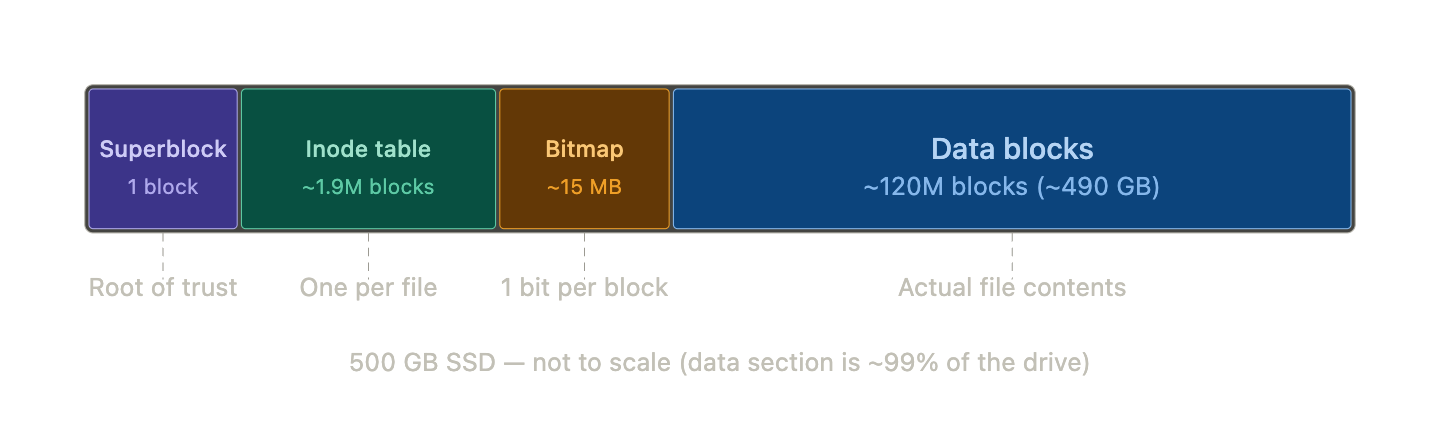
A quick disclaimer: this is the simplified layout for a basic filesystem. If you try to understand something like APFS, you'll find the same core concepts, just over-engineered into oblivion. For explaining we will keep things simple :-)
Before the formatter writes a single byte, it has to do some counting. It reads the drive's reported capacity and block size, then works out how to divide the space:
Total capacity:           500 GB
Block size:               4096 bytes
Total blocks:             500,000,000,000 / 4096 ≈ 122 million blocks
Inodes to allocate:       based on an assumption (we'll get to this)
Blocks for inode table:   (inode count × 256 bytes) / 4096
Remaining:                data blocks
Let's walk through each section of this layout.
The Superblock
The superblock is the very first thing the formatter writes, and it always fits inside a single block, by design it never spans two. It lives at a known, fixed location (byte offset 1024 on ext4, block 0 on APFS), and it holds the vital stats of the entire filesystem:
Magic number            → identifies the filesystem type (ext4? APFS? the
                          kernel knows just by reading the first few bytes)
Block size              → 4096 bytes
Total block count       → ~122 million
Total inode count       → however many we calculated
Free block count        → almost all of them on a fresh drive
Free inode count        → all of them
Inode table start       → "inode table begins at block 2"
Data blocks start       → "data begins at block 50000"
Mount count             → 0
Last mount time         → 0
Filesystem state        → clean
There are other fields, but these are the essentials every filesystem needs.
Here's the thing about the superblock, it's the root of trust for the entire filesystem. If it's corrupted, the kernel won't even try. No valid superblock, no filesystem. Full stop.
When the superblock gets read
When you mount a drive (not for the first time , just a normal Tuesday), the kernel reads the superblock from its known location, validates the magic number, and copies the whole thing into memory. From that point on, all file operations work against the in-memory copy. The kernel almost never touches the on-disk superblock again during normal use.
When the superblock gets written
Not all fields update at the same time, and the logic breaks into three categories:
Static fields , the magic number, total block count, block size, etc, are written once during formatting. Unless you're resizing the partition later, these never change.
Dynamic counters , free blocks, free inodes , change every time you create, delete, or modify a file. But the kernel isn't hammering the SSD after every single operation. It syncs these back to disk periodically, or when you run sync, or when you safely unmount.
Mount-related fields track whether the filesystem was shut down properly, think of it like a sign on a door. When you mount the drive, the kernel increments the mount count, updates the timestamp, and marks the state as dirty. The sign now reads "OPEN , someone's in here." When you safely eject, the kernel finishes all pending writes, makes sure everything is consistent, and flips the state back to clean. Sign reads "CLOSED."
Now imagine the power cuts while the sign still says "OPEN." Nobody got to flip it back. The kernel was in the middle of something , maybe it was halfway through writing a file, maybe it updated the bitmap but hadn't touched the inode yet, maybe dirty pages in the page cache never got flushed to disk. The filesystem could be in a half-finished, inconsistent state, and nobody ran the cleanup.
So the next time you plug the drive in, the kernel reads the superblock, sees the dirty flag, and knows the last session didn't end gracefully. Before it lets you use the drive, it runs a recovery step , either a full disk check (fsck) that walks the entire filesystem hunting for inconsistencies, or a journal replay if the filesystem keeps a journal (most modern ones do). A journal is a small log where the kernel writes "I'm about to do X" before actually doing X. If the system crashed mid-X, the journal tells recovery exactly what was in progress and how to undo or finish it. It's a transaction log, same idea databases use.
The mount count itself is simpler , it just goes up by 1 every time you mount. Some filesystems use it as a safety net: after 30 or so mounts, run a full check regardless, just to be safe.
Inodes: Every File's ID Card
Now we get to arguably the most important struct in the whole filesystem. Every single file , and every single directory, but we'll get to that twist later , gets an inode. One file, one inode. No exceptions. A 1-byte text file? Gets an inode. Your 47 GB 4K video? Also exactly one inode. This rule is important to internalize.
An inode is just a small struct, 256 bytes, that holds metadata about a file:
struct inode {
    mode_t    permissions;   // rwxr-xr-x
    uid_t     owner;         // UID 501
    gid_t     group;         // GID 20
    size_t    file_size;     // 9344 bytes
    time_t    modified;      // timestamp
    block_ptr data_blocks[]; // which blocks hold the actual data
};
And this isn't just theory you read and mug up as trivia. If you have a lot of time you can dig into the code for the filesystem in your kernel. Here's the struct from my Mac, straight from the SDK headers , small correction on what this actually is, though: it's what stat() hands back to userspace, not the inode itself. st_ino is the inode number, a receipt, not the thing it refers to. The real on-disk inode, the one APFS or ext4 actually keep, lives somewhere these headers don't show you:
// /Library/Developer/CommandLineTools/SDKs/MacOSX.sdk/usr/include/sys/stat.h

struct ostat {
    __uint16_t      st_dev;         /* inode's device */
    ino_t           st_ino;         /* inode's number */
    mode_t          st_mode;        /* inode protection mode */
    nlink_t         st_nlink;       /* number of hard links */
    __uint16_t      st_uid;         /* user ID of the file's owner */
    __uint16_t      st_gid;         /* group ID of the file's group */
    __uint16_t      st_rdev;        /* device type */
    __int32_t       st_size;        /* file size, in bytes */
    struct  timespec st_atimespec;  /* time of last access */
    struct  timespec st_mtimespec;  /* time of last data modification */
    struct  timespec st_ctimespec;  /* time of last file status change */
    __int32_t       st_blksize;     /* optimal blocksize for I/O */
    __int32_t       st_blocks;      /* blocks allocated for file */
    __uint32_t      st_flags;       /* user defined flags for file */
    __uint32_t      st_gen;         /* file generation number */
};
All the things match with what I read in OSTEP (btw most of this article is built on concepts from that book, it's free and brilliant, go read it).
How many inodes do we make?
Here's a problem: at format time, the kernel has no idea what you're going to do with this drive. Maybe you'll store a million tiny config files. Maybe you'll dump four 100 GB movies. It can't know.
So it guesses. The standard heuristic is: one inode per 16 KB of space. It assumes the average file will be roughly 16 KB, does the division, and provisions that many inodes.
500,000,000,000 bytes / 16,384 bytes per file = 30,517,578 inodes (≈31 million)
Each inode is 256 bytes, so the inode table eats up:
30,517,578 × 256 / 4096 = 1,907,348 blocks (≈1.9 million blocks, ~7.8 GB)
Wait , the math is not mathing?
If you've been paying close attention to the math, something should be bugging you. We calculated the inode count based on the full 500 GB. But the superblock, the inode table itself, and the bitmap all also live on that 500 GB. We're provisioning inodes for space that will never hold files. Isn't that a lil chicken-and-egg situation? At the end of the day we have to have inodes for only files that live in the data blocks, but while formatting we can't really know what the size is unless we have taken out the space for superblock, inode table, bitmap section, out of the total capacity, which again we can't know with the future files we will have! I hope i'm being able to communicate the doubt here that i had, so i'm mentioning it here.
So yes. It absolutely is. And the kernel's answer is: it doesn't care.
Here's why. The 16 KB ratio is already a wild guess. The kernel has no idea if you'll create ten files or ten million. Being mathematically precise about overhead doesn't actually produce a better estimate , it just makes the formatter more complex and more prone to bugs.
And the waste is laughably small. Those "extra" inodes for the 7.8 GB of overhead? That's about 488,000 unnecessary inodes, which take up roughly 125 MB. On a 500 GB drive. The system engineers will take that trade every single time.
Now coming back to the size estimation for the inode section of the layout and therefore total inodes. There's also a scarier reason: running out of inodes is a nightmare. There's a famous error , No space left on device , (also called inode busting) that sometimes hits users who have 50 GB of free space left. How? They created so many tiny files that they exhausted every inode, even though the data blocks were mostly empty. Inode table is full means the data section is full, as far as the filesystem is concerned. Formatters would rather over-provision than let that happen.
And that No space left on device error isn't just a theoretical footnote , it's a real operational headache in specific environments. CDN edge servers that cache millions of tiny assets , thumbnails, CSS files, JavaScript bundles, 1x1 tracking pixels , can burn through inodes fast. The files are small (often under 4 KB each), but there are millions of them. The data blocks are barely touched, but the inode table is completely full. Same story with mail servers and container and CI/CD environments, basically any use case where lots of tiny files are involved.
The fix is usually to reformat with a lower bytes-per-inode ratio (say, 4096 instead of 16384), which allocates more inodes at the cost of a larger inode table. Or you switch to a filesystem like XFS or Btrfs that allocates inodes dynamically instead of fixing the count at format time.
(If you're curious: modern filesystems like ext4 actually dodge this problem more elegantly by dividing the disk into ~128 MB "block groups" and stamping a repeating pattern of superblock-copy + bitmap + inodes + data onto each group. They never have to calculate the overhead for the whole drive at once. But for understanding the concept, the flat model works perfectly.)
Indirection: How 256 Bytes Points to Half a Terabyte
This is a brilliant piece of engineering. A single inode is 256 bytes. Some files are hundreds of gigabytes. How does a 256-byte metadata struct track all that data?
The answer is a beautiful trick called indirection , the same idea as a pointer to a pointer in C, except on disk.
(Quick disclaimer before the pointer math: this is the classic Unix textbook inode, not what's actually sitting on your ext4 or APFS drive. Real ext4 uses extents instead of walking indirect blocks, and the old-school pointers were 4 bytes, not 8 , 1024 per block, not 512. None of that changes the idea. Indirection is still indirection. Just don't go hunting for this exact struct on your Samsung NVMe.)
Every inode has 15 block pointers. The first 12 are direct pointers. Each one points straight to a data block. That gives you 12 × 4 KB = 48 KB of addressable space. Plenty for tiny files, and most files on your system are tiny.
The 13th is a single indirect pointer. It doesn't point to data , it points to a block full of pointers. One block holds 4096 / 8 = 512 pointers (8-byte pointers, in this model). So this one slot gives you 512 × 4 KB = ~2 MB more.
The 14th is a double indirect pointer. It points to a block of pointers that each point to blocks of pointers. 512 × 512 = 262,144 pointers. That's ~1 GB.
The 15th is a triple indirect pointer. Pointers to pointers to pointers to data. 512 × 512 × 512 = ~134 million pointers. That's over 500 GB from a single entry in a 256-byte struct.
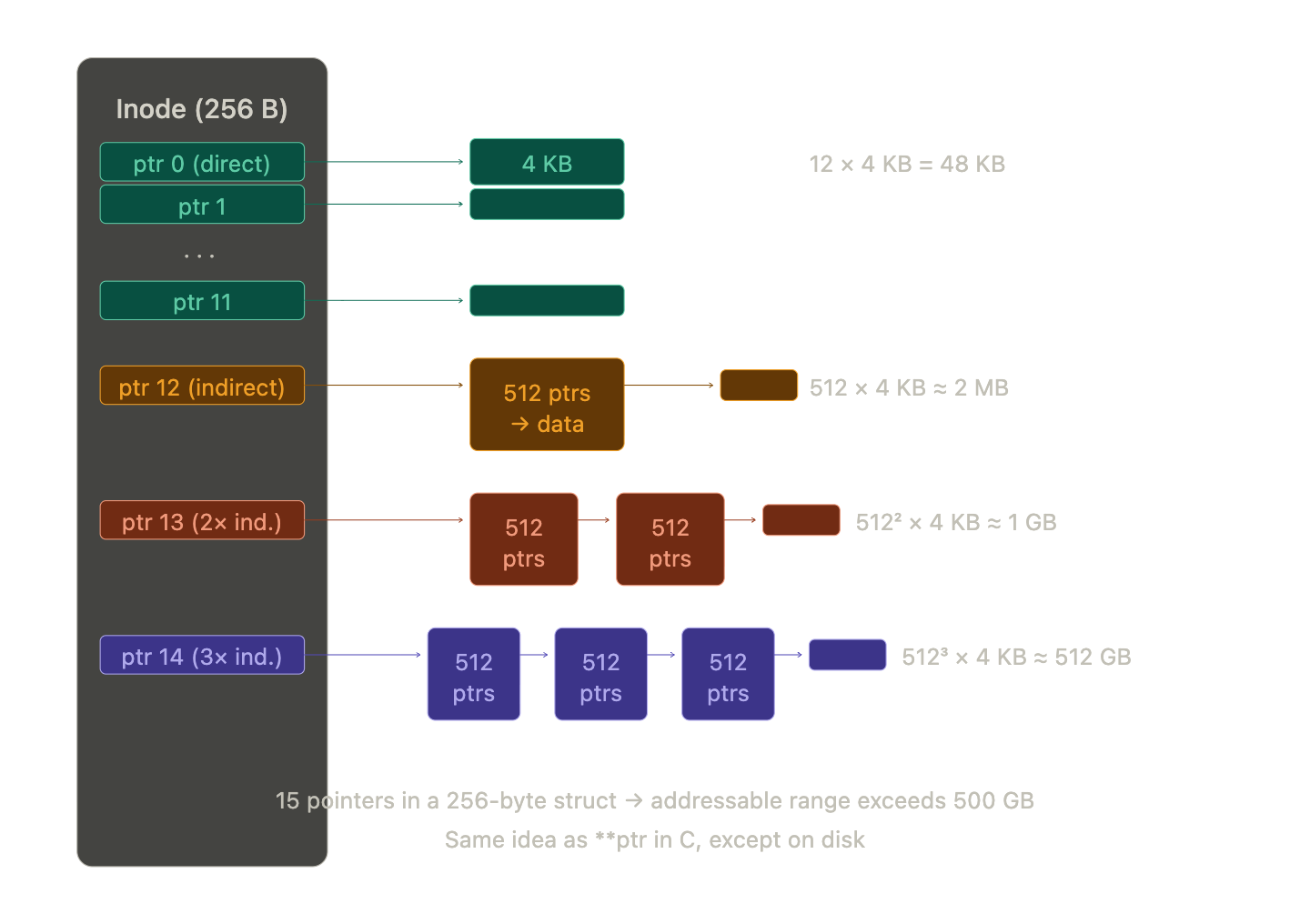
It's pointers all the way down. If you've ever written **ptr in C and felt confused, congratulations, your filesystem has been doing the same thing on disk this whole time and handling it better than you.
The Block Bitmap: 15 Megabytes of Bookkeeping
The block bitmap is the simplest structure in the entire filesystem. It uses exactly one bit per data block. A 1 means occupied, a 0 means free. For 122 million blocks, that's 122 million bits, roughly around 15 MB. That's it. The entire free-space map for a 500 GB drive fits in 15 megabytes.
When the kernel needs to write new data, it scans this bitmap to find blocks marked 0, claims them, flips the bits to 1, and writes the data. I hear you asking "how does the mapping work?" well good question! The kernel knows from the superblock that the data section starts at, say, block 10,000. The mapping between bitmap bits and data blocks is pure arithmetic:
Bit 0  →  Block 10,000
Bit 1  →  Block 10,001
Bit 2  →  Block 10,002
...
So if the kernel wants to check whether block 15,000 is free, it subtracts: 15,000 - 10,000 = 5,000. It needs the 5,000th bit.
But here's the catch, we all know CPUs are byte-addressable, not bit-addressable. You can't ask a computer system to "read bit 5,000." You have to fetch the byte that contains it.
Two small operations. Divide by 8 to find the byte: 5000 / 8 = 625, fetch the 625th byte of the bitmap. Then modulo 8 to find the bit within that byte: 5000 % 8 = 0, check bit 0 of that byte.
The kernel loads the byte into a register, applies a bitwise AND mask, and instantly knows: free or occupied. When it needs to allocate, it scans bytes sequentially looking for anything that isn't 0xFF (all eight blocks taken), locates the 0 bit, flips it, and reverse-calculates the block number. Very mechanical and rapid.
Directories
We've saved the best part for last, and it starts with a misconception. You might think inodes only belong to files, the "leaf nodes" in your directory tree, and that directories are some special container type that the OS handles differently.
They're not. A directory is just a file.
The only difference is a tiny flag inside the inode's mode field that tells the kernel: "the data blocks for this inode don't contain document text or video frames , they contain a name-to-number lookup table."
Let's look at what lives inside a directory's data blocks. Say you have a directory called projects/ that contains two files:
projects/
├── fruits.txt
└── sample.txt
The directory projects/ has an inode , let's say inode 64345000. When the kernel reads the data blocks that this inode points to, it doesn't find file contents. It finds a table like this:
| Name | Inode Number |
|---|---|
. |
64345000 |
.. |
64340000 |
fruits.txt |
64346628 |
sample.txt |
64346700 |
That first entry, ., points to 64345000, that's the directory pointing to itself. That's why cd . does nothing , you're telling the kernel "resolve this inode" and it resolves to where you already are. The second entry, .., points to 64340000, the parent directory, which is how cd .. works. These two entries exist in every single directory on the system.
The other two entries are the actual files. But notice: the names fruits.txt and sample.txt don't live inside those files. They live here, inside the directory's lookup table. The files themselves have no names. A file is just an inode number. The "name" is just a label that a particular directory has assigned to that number.
This means renaming a file doesn't touch the file at all , it just edits the directory's table. Moving a file between directories on the same filesystem doesn't copy any data , it deletes the entry from one directory's table and adds it to another's. The inode, the data blocks, everything stays exactly where it is. mv is lying to you about how much work it's doing.
The Filesystem Is a Tree
Step back and look at the shape of what we've built. The root directory / is a directory file whose table points to other directories. Those directories point to more directories or to files. Directories never form cycles (ignoring hard links for now). This is a tree, the same tree data structure you've seen in algorithms, with directories as internal nodes and regular files as leaves.
            / (inode 2)
           / \
        home   etc
        /       \
     ubuntu    passwd (file)
      /
   fruits.txt (file)
Every edge in this tree is a name-to-inode mapping stored inside a directory's data blocks. The tree isn't stored as a tree anywhere , there's no "tree structure" on disk. It emerges from directories pointing to other directories. The shape exists only because of the lookup tables.
Path Resolution
When you type cat /home/ubuntu/fruits.txt, the kernel doesn't know where that file lives. It walks the path, one hop at a time, starting from a hardcoded rule: the root directory / is always inode 2. Well , on ext it is. APFS doesn't play by that rule, but we're staying in ext-land for this walk, so inode 2 it is. Everything else is discovered by walking.
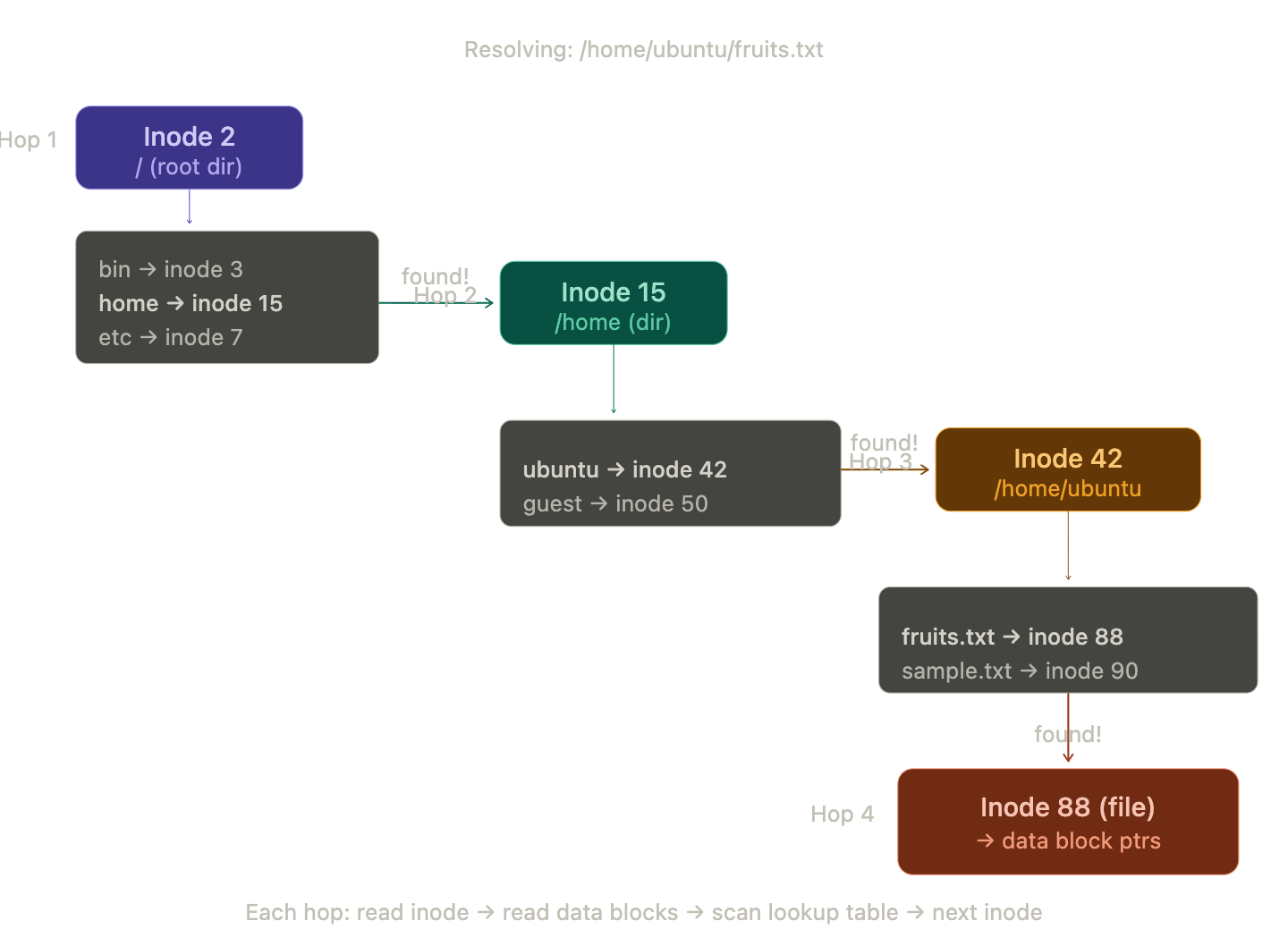
Here's the full walk:
Hop 1: The kernel reads inode 2 from the inode table. It checks the mode flag, yes, this is a directory. It follows the data block pointers to read the directory's lookup table. It scans for the name home. Found it , mapped to inode 15.
Hop 2: The kernel reads inode 15. Directory flag set. Reads its data blocks. Scans for ubuntu. Found , inode 42.
Hop 3: The kernel reads inode 42. Directory flag set. Reads its data blocks. Scans for fruits.txt. Found , inode 88.
Hop 4: The kernel reads inode 88. No directory flag, this is a regular file. The resolution is complete. The kernel now has the inode, which contains the file size, permissions, timestamps, and , critically , the block pointers that lead to the actual file data.
Four hops. Every cd, every ls, every open() call triggers this walk. The path you type is just a treasure map , the real addresses are inode numbers, and the directories are the clues.
What happens when it fails
If at any hop the kernel scans the directory table and doesn't find the next name in the path, the walk stops immediately and the kernel returns ENOENT , the error code behind every "No such file or directory" message you've ever seen. It doesn't guess, it doesn't search elsewhere. The path is a precise set of instructions, and if any step fails, the whole thing fails.
There's another failure mode: permission denied. At every single hop, the kernel checks whether the current user has execute permission on the directory. Yes, execute on a directory , that's what the x bit means for directories. It's the permission to traverse, to look up names inside that directory. If you have read permission but not execute, you can ls the directory and see the names, but you can't cd into it or resolve any path through it. The walk stops and the kernel returns EACCES. If you want to read more about Unix permissions, the chmod man page is the canonical source.
What happens when it succeeds
Once the kernel holds the final inode, it still has work to do. The open() system call doesn't actually read the file data , it just sets up a file descriptor, an entry in the process's open file table that says "this process has inode 88 open for reading." The file descriptor is just a small integer , 0, 1, 2, 3 , that the process uses as a handle.
The actual data only gets loaded when the process calls read(). At that point, the kernel looks at the inode's block pointers, figures out which data blocks it needs, and reads them off the SSD. But even here, it doesn't just dump raw blocks into the process , it goes through the page cache first, which brings us to the next section.
I/O Speed
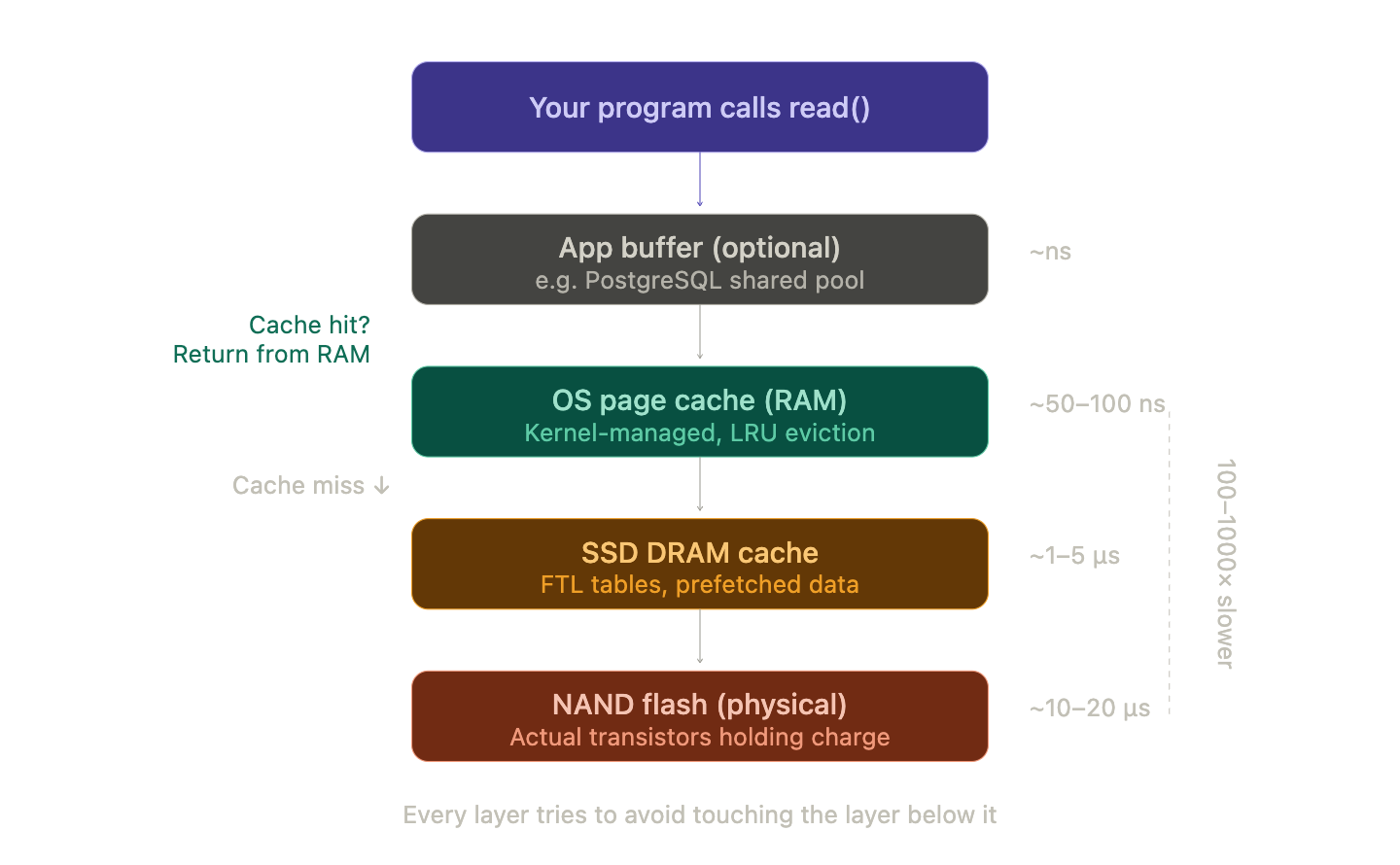
We've been talking about blocks on an SSD as if the kernel reads them directly every time you access a file. In reality, there are multiple layers of caching between your program and the physical NAND flash, and they exist for one reason: disk I/O is brutally slow compared to RAM.
To put numbers on it:
| Storage Type | Read Latency | Sequential Read Speed |
|---|---|---|
| CPU L1 Cache | ~1 ns | — |
| RAM (DDR4/5) | ~50–100 ns | ~50 GB/s |
| NVMe SSD | ~10,000–20,000 ns | ~3–7 GB/s |
| SATA SSD | ~50,000–100,000 ns | ~500 MB/s |
| HDD (spinning disk) | ~5,000,000–10,000,000 ns | ~100–200 MB/s |
RAM is roughly 100x–1000x faster than an SSD depending on the access pattern. A spinning hard drive is another order of magnitude slower. This gap is why every layer of the system is trying desperately to avoid touching the disk.
Layer 1: The Page Cache (OS-level)
The kernel maintains a massive page cache in RAM , a pool of recently-read (and recently-written) disk blocks kept in memory. When a process calls read(), the kernel checks the page cache first. If the block is already there (a "cache hit"), the data is served from RAM without touching the SSD at all.
This is why opening a file for the second time feels instant , the first read loaded the blocks into the page cache, and the second read just grabs them from memory. It's also why your system's "free" RAM always looks low: the kernel aggressively fills unused RAM with cached disk data, because empty RAM is wasted RAM. If you've ever panicked looking at htop and seeing 14 out of 16 GB "used," relax. Most of that is cache, and the kernel will happily evict it the moment a real program needs the memory.
Writes go through the page cache too. When a process calls write(), the kernel updates the page in memory and marks it as dirty. It doesn't immediately write to disk. The dirty pages get flushed to disk later , by a background kernel thread, or when the process calls fsync(), or when memory pressure forces an eviction. This is called write-back caching, and it's why pulling the plug on a computer can lose recent changes.
Layer 2: The Disk's Own Cache
Your SSD also has its own DRAM cache , usually 256 MB to a few GB, depending on the model. The SSD's firmware uses this to buffer incoming writes, cache its internal mapping tables (the FTL we talked about earlier), and pre-fetch data it predicts you'll need next. The firmware on that microcontroller is running its own little caching strategy independently of the OS. It's caches all the way down, just like it was pointers all the way down.
So when you read a file, the data might travel through three caches before reaching your program: the SSD's DRAM cache, then the OS page cache, then potentially the CPU caches. When you write, the data passes through the same chain in reverse.
Layer 3: Application-Level Buffering
Applications often add yet another layer. Databases like PostgreSQL maintain a shared buffer pool , a managed cache in userspace, separate from the OS page cache. When PostgreSQL needs a table row, it checks its own buffer pool first, only hitting the OS (and therefore the disk) if the page isn't cached locally. Databases do this because they understand their own access patterns better than the generic kernel LRU algorithm can.
This is also why databases use O_DIRECT or fsync() strategically , they need precise control over when data actually hits persistent storage, because "the write went to a cache somewhere" isn't good enough when you're guaranteeing transactional durability. The database needs to know: is this on the physical disk, or is it still floating in some volatile cache that would vanish in a power failure?
RAMDisk: Cutting Out the Middleman
If caching disk data in RAM is so fast, why not skip the disk entirely? That's exactly what a RAMDisk does , it carves out a chunk of RAM and presents it to the OS as a block device, with a full filesystem on top. The kernel formats it, creates a superblock, builds an inode table , the whole ceremony we've been discussing , except the underlying "blocks" are just RAM addresses.
Read and write speeds on a RAMDisk are essentially the speed of your RAM: tens of GB/s, with nanosecond-level latency. The catch is obvious: when power goes out, everything vanishes. RAMDisks are useful for temporary build artifacts, scratch space, and workloads where speed matters more than persistence.
The Full Picture
Zoom out and look at what we've built from that featureless array of transistors.
The superblock is the root of trust, holding every vital stat the kernel needs to bring the filesystem online. The inode table stores one 256-byte card per file, tracking ownership, permissions, size, and block pointers that lead to the actual data. The block bitmap uses one bit per block, 15 MB of bookkeeping for a 500 GB drive, checked with nothing more than integer division and a bitmask. The directories are files posing as folders, mapping human-readable names to inode numbers. And the page cache sits between all of this and your program, making sure the kernel touches the disk as rarely as it can get away with.
All of it , every layer, every structure , is managed entirely by the kernel. No user, no application, no firmware ever touches the filesystem directly. You just type ls and see your files. The kernel does the rest.
That's what happens when you plug in your SSD.
Party Trivia
If you want to act cool or chad in parties, if that's something you are familiar with, then these trivias can come really handy:
SSDs forget. NAND flash stores data as electrical charge trapped in transistor cells. Over time, that charge leaks. If you leave an SSD unpowered in a drawer for years, the data degrades. At high temperatures, this can happen in as little as a year. Enterprise SSDs are rated for data retention of about a year at 40°C without power. Consumer drives are more tolerant but not immortal. HDDs, by contrast, store data as magnetic orientation on a spinning platter , their long-term enemy is mechanical corrosion and bearing failure, not charge leak. For archival storage measured in decades, spinning disks are still more reliable than flash. Your SSD is fast but it's also kinda needy , it needs you to plug it in every once in a while or it starts forgetting things. Like a Tamagotchi, but for your data.
The stat command is a filesystem tourist. When you run stat filename on a Unix system, you're reading the inode directly. Every field we discussed , permissions, size, timestamps, block count , gets printed to your terminal. Try it right now. It makes the whole theory concrete.
Hard links break the tree. We said the filesystem is a tree, but hard links let two different directory entries point to the same inode. Now one file has two names in two different directories. The inode tracks this with a link count (st_nlink in the struct above). The file's data blocks only get freed when the link count hits zero. This is why rm in Unix is technically "unlink" , it removes a directory entry and decrements the count, not necessarily deletes the data.
Everything is a file. Directories are files. /dev/null is a file. Your keyboard is /dev/input/event0 , a file. When you run a program, the input it reads and the output it creates, or errors if written by me, they all pipe into stdin, stdout and stderr, these are OS-level files and the terminal shell output is where stdout and stderr go live. Same with network sockets, pipes, device drivers , all exposed as files. This isn't a cute metaphor. It's a literal design decision: the Unix kernel exposes nearly everything through the same open/read/write/close interface, backed by inodes, handled through file descriptors. The filesystem isn't just where your data lives , it's the OS's universal API.
Further Reading
If this article got you curious and you want to go deeper, here are some resources that are genuinely worth your time:
OSTEP (Operating Systems: Three Easy Pieces) , Free online textbook. The chapters on file systems (36-42) are what most of this article is built on. Brilliantly written, doesn't assume you know everything already.
The Linux Kernel Documentation on Filesystems , If you want to see how ext4, XFS, and Btrfs actually implement these concepts. Dense but authoritative.
CS:APP (Computer Systems: A Programmer's Perspective) , Covers the full stack from bits to processes. The I/O chapters connect directly to the caching and page cache concepts we discussed.
ext4 Wiki , Practical details on block groups, journaling, and all the real-world engineering that ext4 does on top of the simple model we covered.